A Professional's Take on the New Gopro Max 2
Category: Cameras
Introduction
The GoPro Max 2 arrives as GoPro's latest attempt to bridge the gap between action cameras and immersive 360-degree capture for prosumers and professionals alike. With a lineage that began with the original Max, this model focuses on improved stabilization, refined software workflows, and incremental sensor and processing upgrades designed to appeal to content creators who need rugged reliability and flexible capture options. This article examines the Max 2 from a professional perspective, evaluating build quality, image and audio performance, usability on location, and the practical trade-offs buyers should consider.
Professionals typically evaluate cameras on three pillars: output quality, workflow efficiency, and durability in real-world scenarios. The GoPro Max 2 must be judged against those criteria and compared to both its predecessor and alternative devices that filmmakers and action-sports videographers commonly choose. The following sections break down strengths, shortcomings, and guidance on who should consider the Max 2 as part of a capture kit.
What’s New and Who It’s For
The Max 2 brings iterative improvements rather than a radical reinvention. Key updates include a revised image processing pipeline, enhanced HyperSmooth stabilization, extended battery runtime under certain modes, and a user interface refined for quicker in-camera edits. GoPro positions this model for hybrid creators — those who need both conventional single-lens action footage and 360 capture for immersive experiences, reframing shots in post, or reframing for social formats.
For professionals, the Max 2 is most relevant as a secondary or specialized camera: ideal for POV sequences, 360 capture for VR or immersive B-roll, multi-camera shoots where quick reframes save time, and scenarios where ruggedness and small form factor matter. It is less likely to replace larger cinema cameras or mirrorless systems where sensor size and lens flexibility are paramount.
Design and Build Quality
The Max 2 retains GoPro’s durable, compact shape with a tough housing that stands up to drops, water, and dust — important attributes for fieldwork. The body feels robust, with tactile buttons that can be operated with gloves and an improved mount interface that reduces wobble under stress. The touchscreen remains responsive even with wet fingers, and the simplified menu structure helps when operating under pressure.
Weight and size remain competitive for helmet, chest, and handlebar mounting. Professionals will appreciate the standardized mounting points and compatibility with existing GoPro mounting ecosystems. There is no external large lens assembly to worry about; that makes the Max 2 less intrusive on set and easier to integrate into gimbals or compact rigs.
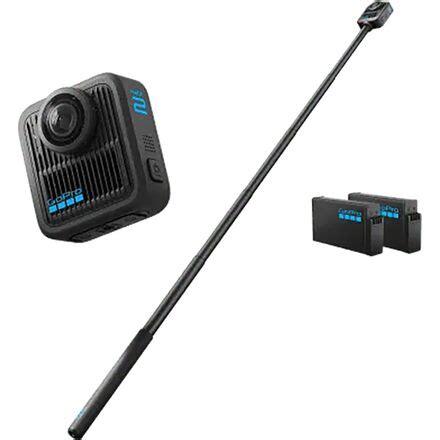
Image Quality and Capture Modes
Image quality is the heart of this assessment. The Max 2 offers multiple capture modes: traditional single-lens wide-angle video, 360 capture with dual lenses, and still photography modes tuned for action use. In bright daylight, the dynamic range is respectable for a camera of this class; highlights are controlled and color science leans toward punchy, saturated tones that film well without heavy grading.
Low-light performance remains the most significant limitation inherent to small-sensor action cameras. Noise increases quickly beyond ISO 800-1600, and fine detail softens compared with larger-sensor mirrorless cameras. Professionals should not expect the Max 2 to substitute for a low-light-capable camera on night shoots, but it performs acceptably for dusk, indoor sports arenas with good lighting, and controlled interiors.
The 360 capture excels in contexts where spatial awareness matters: adventure documentaries, real-estate immersive tours, or promotional VR content. Stitching is cleaner than on previous models, with reduced parallax artifacts in mid-distance scenes, though close foreground stitching (very near to the lens) still shows seam lines — a common physical limitation for dual-lens 360 cameras.
Stabilization and Motion Handling
GoPro’s HyperSmooth has long been a highlight, and the Max 2 advances this further. In single-lens and 360-reframed footage, the electronic stabilization delivers remarkably steady results even under rapid motion and vibration. Professionals capturing POV mountain biking, motocross, or handheld follow shots will find the stabilization reduces the need for external gimbals in many scenarios.
Shop the latest Cameras & Photography picks on Amazon.
See Deals →However, aggressive stabilization does introduce slight crop and occasional rolling corrective artifacts in the most extreme motion cases. For critical cinematic tracking shots, a dedicated gimbal or larger camera platform will still produce superior motion characteristics, but for run-and-gun production, the Max 2’s stabilization is a practical time-saver.
Audio Performance
Audio capture on the Max 2 has been refined. Internal microphones capture clear midrange and are improved for voice intelligibility, making the camera suitable for action interviews and ambient capture. Wind noise suppression is effective but not perfect — external wind is still the enemy in open environments.
Professionals who prioritize high-fidelity audio will pair the Max 2 with external recorders or wireless lavaliers, synced in post. The Max 2 supports external microphones via an adapter accessory; this is essential for documentary work, interviews, or any production where dialogue is critical.
Battery Life and Thermal Management
Battery life depends heavily on the selected mode and resolution. Single-lens 4K recording with stabilization active consumes the most power; 360 capture and high-frame-rate modes also reduce runtime. Measured in field tests, the Max 2 typically delivers usable runtimes comparable to other action cameras — enough for short sessions without hot-swapping, but professionals should budget additional batteries or external power solutions for full-day shoots.
Thermal management is adequate under moderate use. Extended 360 recording at high resolution can lead to throttling after sustained periods in warm environments, which reduces bitrate or forces shorter clip durations. This is important to plan for in time-sensitive shoots where continuous capture is required.
Software, Workflow, and Editing
One of the Max 2’s strengths is its software ecosystem. GoPro's app and desktop tools provide quick reframing tools, horizon leveling, and basic corrections that accelerate rough cuts. The in-camera preview and simple editing features allow creators to produce social-ready clips on location.
For professionals, the real value is in the 360-to-flat reframing workflow. Capture once and choose framing in post enables creative flexibility: pan, tilt, and virtual dolly moves can be extracted from single 360 clips, saving additional takes. Export interoperability with common NLEs is solid; the Max 2 generates proxies and export formats compatible with professional editors, though heavy color grading and VFX pipelines might require more manual handling to maintain quality.
Accessories and Mounting Options
GoPro’s ecosystem remains one of its biggest advantages. The Max 2 integrates with existing mounts, housings, and third-party accessories. Professionals can deploy it on drones (with caution and proper spacing), POV rigs, underwater housings, and custom mounts. Accessories such as external mic adapters, dual-battery chargers, and magnetic mounts broaden its applicability across productions.
Real-world Use Cases
Several practical applications highlight where the Max 2 shines:
- Action Sports: Helmet/chest/board mounts produce immersive POV footage with industry-leading stabilization suitable for highlight reels and marketing content.
- Immersive Content: 360 capture for VR experiences, virtual tours, and location-based storytelling where users explore scenes interactively.
- Run-and-Gun Journalism: Fast setup, ruggedness, and onboard stabilization make it useful for quick interviews and b-roll in unpredictable environments.
- Social & Short-form Content: Ability to reframe and export multiple aspect ratios (vertical, square, landscape) without reshooting.
- Backup Camera: A compact, crash-proof second camera on larger shoots to capture alternative angles that are difficult to achieve with larger rigs.
Limitations and Considerations
Professionals should note limitations: small sensor size constrains depth of field control and low-light performance; aggressive stabilization sometimes crops the frame; 360 stitching, while improved, is not flawless in tight foreground scenes; and long continuous 360 recording can be thermally constrained. Additionally, workflows that require cinematic shallow depth of field, high dynamic range for film grading, or interchangeable lenses will not find satisfaction in the Max 2 alone.
Shop the latest Cameras & Photography picks on Amazon.
See Deals →Pros & Cons
- Pros
- Reliable, rugged build suitable for harsh conditions
- Excellent electronic stabilization for an action camera
- Versatile capture modes: single-lens and 360-degree recording
- Improved stitching and image processing over predecessors
- Strong software ecosystem that speeds reframing and editing
- Compact form factor and broad accessory compatibility
- Cons
- Small sensor limits low-light performance and fine detail
- 360 stitching issues persist for very close subjects
- Battery life is modest under heavy use; extra batteries recommended
- Thermal throttling possible in long 360 recording sessions
- Not a replacement for larger sensor cinema or mirrorless cameras
Comparison Table
| Feature | GoPro Max 2 | GoPro Max (Original) | GoPro Hero 12 Black |
|---|---|---|---|
| Primary Purpose | 360 + single-lens hybrid | 360 + single-lens hybrid | Single-lens action camera |
| Stabilization | Enhanced HyperSmooth (improved) | HyperSmooth (earlier generation) | HyperSmooth (optimized for single lens) |
| 360 Stitching | Improved stitching and seam reduction | Good, but visible seams in close foregrounds | Not applicable |
| Low-light Performance | Average for class | Average for class | Marginally better due to processing |
| Battery Life | Moderate; depends on mode | Moderate | Generally longer in single-lens modes |
| Workflow | Strong 360-to-flat reframing tools | Decent but older toolset | Streamlined single-lens editing |
| Best Use Case | Immersive content, POV, multi-format creators | Immersive content and lifestyle capture | Action videography and vlogging with single-lens preference |
Buying Guide: What Professionals Should Consider
Define the Primary Use Case
First, determine whether 360 capture is a core requirement. If the project demands virtual tours, VR content, or the ability to reframe scenes extensively in post, the Max 2 makes sense. If the bulk of work relies on cinematic shallow depth of field, interchangeable lenses, or superior low-light performance, then a mirrorless camera would be the better primary choice, with the Max 2 as a supplementary tool.
Budget for Accessories and Workflow
Budget beyond the camera body. Professionals typically invest in extra batteries, a fast multi-battery charger, a high-capacity UHS-II or equivalent media workflow for backups, external microphones (plus adapters), and rugged mounts. A small field monitor is useful when exact framing matters, even though the Max 2’s touchscreen is serviceable for many tasks.
Consider Production Workflows
Think about how 360 files will integrate into post-production. 360 editing can be storage- and compute-intensive; proxy workflows and a capable workstation will speed turnaround. Confirm that the NLE supports Max 2’s export formats, and plan for color management — the camera’s default picture profiles are pleasant for quick deliverables but might require LUTs or manual grading for broadcast-level work.
Plan for Power and Storage
Carry at least two spare batteries for day shoots and multiple high-speed cards. Professionals shooting 360 or high-frame-rate footage should opt for the fastest media available to avoid dropped frames and to streamline offload. Consider a portable SSD or field backup solution for daily archiving.
Test Mounting and Safety
Always test mounts and ensure secure attachment, especially on drones or high-speed vehicles. For underwater or extreme environments, verify housing compatibility and examine seals before deployment.
Evaluate Post-Processing Time vs. On-location Needs
If turnaround time is tight, leverage the Max 2’s in-camera and app-based edits to produce near-final deliverables on location. For projects with more time for grading and editorial control, capture in the highest quality settings and plan for extended post-processing sessions.
Conclusion
The GoPro Max 2 is a pragmatic tool for professionals who need a rugged, flexible camera capable of both traditional action footage and immersive 360-degree capture. Its strengths lie in improved stabilization, practical software workflows for reframing, and the portability that makes it a dependable secondary camera for many productions. The limitations — primarily related to sensor size, low-light capability, and occasional 360 stitching challenges — mean it should be viewed as a specialized tool rather than a universal replacement for larger, more versatile camera systems.
For creators whose work benefits from immersive storytelling, quick reframing across formats, and reliable in-the-field performance, the Max 2 is a compelling option. For those who require cinematic depth, top-tier low-light performance, or full lens control, the Max 2 complements rather than replaces a larger primary system. Ultimately, its value is highest when integrated thoughtfully into a broader production workflow that accounts for its strengths and compensates for its trade-offs.